
Follow-up tasks after the handover
Tick off what is left after the appointment, with owner and date, plus the reminders new owners get in the maintenance plan.
Who this is for:
Owners
Buyers
1 min readUpdated: 21/09/2026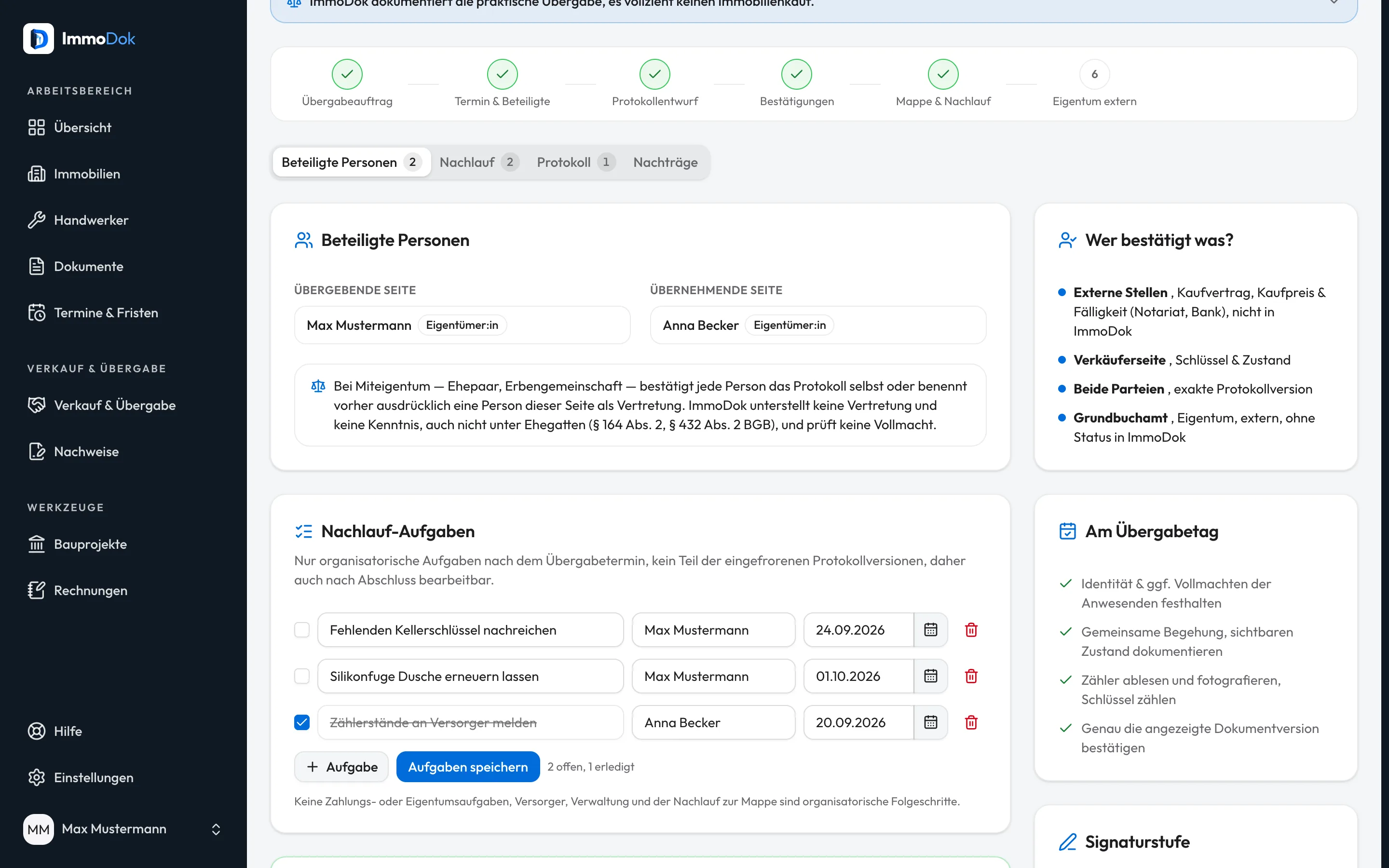
Step by step
- Open the handover and its “Follow-up tasks” card.Editable after completion too
- Add tasks with title, responsible person and due date, “inform the utilities” for instance.Up to 20 tasks
- Tick off what is done and save with “Save tasks”.The status shows open and done
- As the new owner, once the transfer is complete you find suggestions in the maintenance plan: building insurance, chimney sweep, meter readings and property tax.For twelve months
The result: Both sides see what is still open after the appointment, without touching the frozen protocol versions.
Important: Follow-up tasks are organisational and not part of the protocol. Statutory deadlines, for insurance or property tax say, run from the legal change of ownership, not from the folder handover.
Open in the product
What if it does not work?
- The tasks cannot be edited.
- They are locked on a cancelled handover.
Related guides
Generating the handover protocolFreezing turns the working state into an immutable protocol version with SHA-256 checksum and PDF, the copy both sides confirm.Keeping track of dates and deadlinesExpiring evidence, ending warranties, handover appointments and open tasks in one place, as a list, as a month and as a task list.