
Letting ImmoDok read amounts from receipts
ImmoDok reads gross, net, VAT, the labour share under § 35a EStG and the invoice number from uploaded receipts; you check the result.
Who this is for:
Owners
Editors
2 min readUpdated: 21/09/2026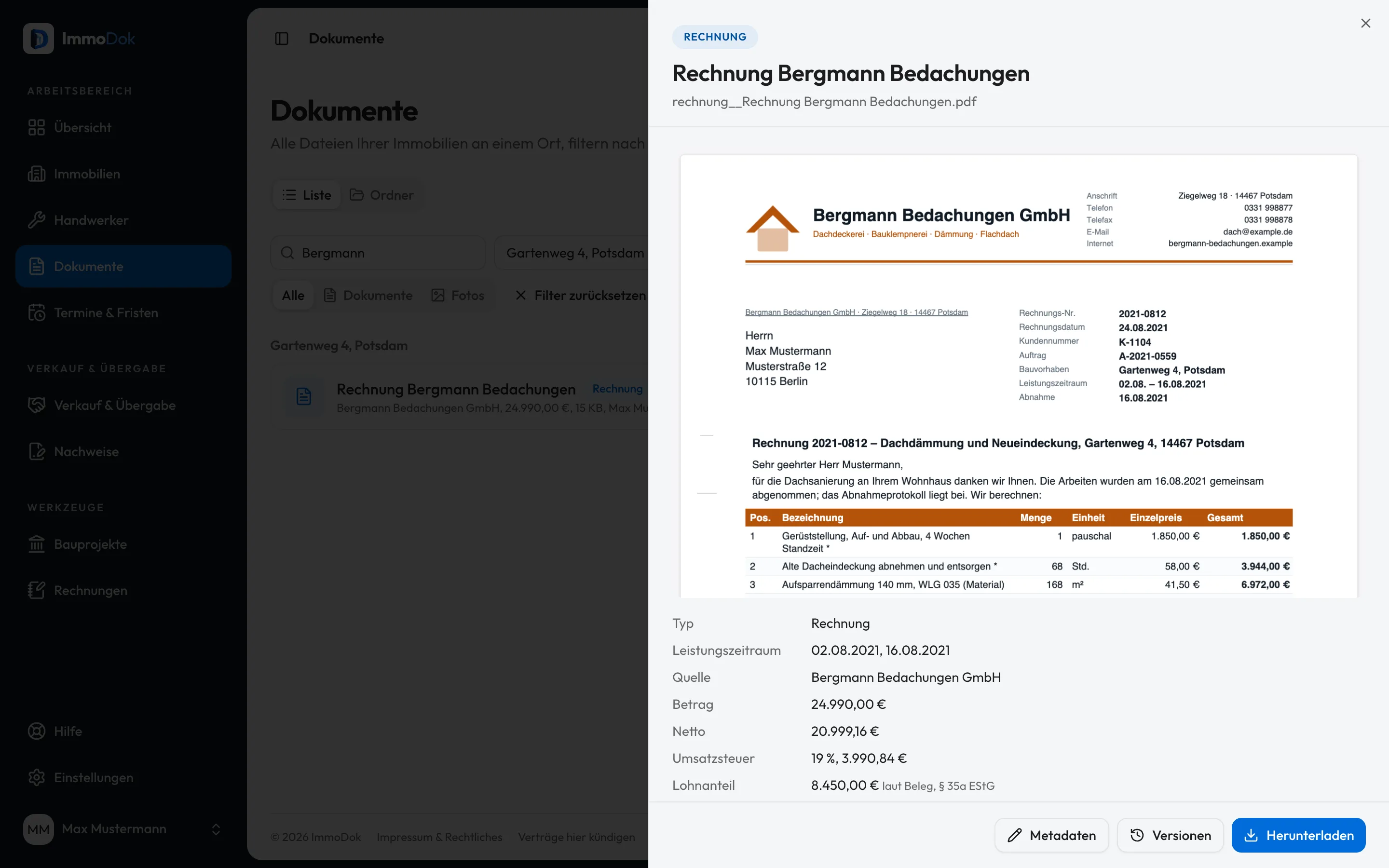
Step by step
- Upload the invoice as a PDF or scan, like any other document.Scans are read by text recognition
- Open the document: below its details are the values read, such as net, VAT, labour share and invoice number.Marked “please check”
- Compare the values with the receipt and correct amount and service period through “Metadata” if needed.The original stays unchanged
- The values feed the tax advisor area, the § 35a tax overview and the yearly package.With a booking batch in the CSV format DATEV documents
The result: Less typing: the receipt carries its amounts, and the yearly overview works with them.
Important: The recognition is automatic. ImmoDok only reads labelled amounts and never estimates a labour share; if it is not on the invoice, it stays empty. Whether an amount has a tax effect is for your tax advisor to judge.
Open in the product
What if it does not work?
- No amounts were recognised.
- The receipt has no readable text or no labelled amounts with cents. Enter the amount by hand in the metadata.
- An e-invoice shows no amount recognition.
- Intended: the e-invoice’s structured data is more precise and takes precedence.
Related guides
Recording an invoice as a receiptAmount, date, issuer and factual category: turning the invoice PDF into a receipt the yearly summary counts.Receiving and keeping e-invoicesXRechnung and ZUGFeRD: store the structured original unchanged, have it checked locally and keep the evidence.Exporting the yearly package for the tax advisorOne calendar year, one package: all original receipts, receipt lists as CSV, a PDF summary and a manifest with checksums.